Your advertising. On every screen. Controlled from your phone.
Digital advertising. On every screen.
Upload a video from your phone – seconds later it plays on your TVs. Playlists, time schedules and emergency ads at the tap of a button. Videos are stored on every TV: if the internet goes down, your advertising simply keeps running.
- Upload videos and images from your phone
- Control every TV with one app
- Schedules: breakfast, lunch, evening
- Emergency ads in one second
- Works without internet
- Plug in a USB stick – done
- Voice assistant in 6 languages
- No mandatory monthly cloud
“Play the döner video on TV 2.”


- Instantly on the TVUpload – done
- Without internetVideos live on every TV
- Phone as remoteAll TVs, one app
- SchedulesCoffee in the morning, menu at noon
- Emergency adsOne tap – all TVs
- USB stickPlug in and play
- Voice assistantJust say what should play
- Your data stays with youNo cloud lock-in
How BestellTakt.TV works
From the video on your phone to the ad on every TV – set up in a few minutes.
-
1
Install the player
The BestellTakt.TV app goes on the TV (Android TV, Google TV, Fire TV) or on a Windows PC at the screen.
-
2
Open the panel
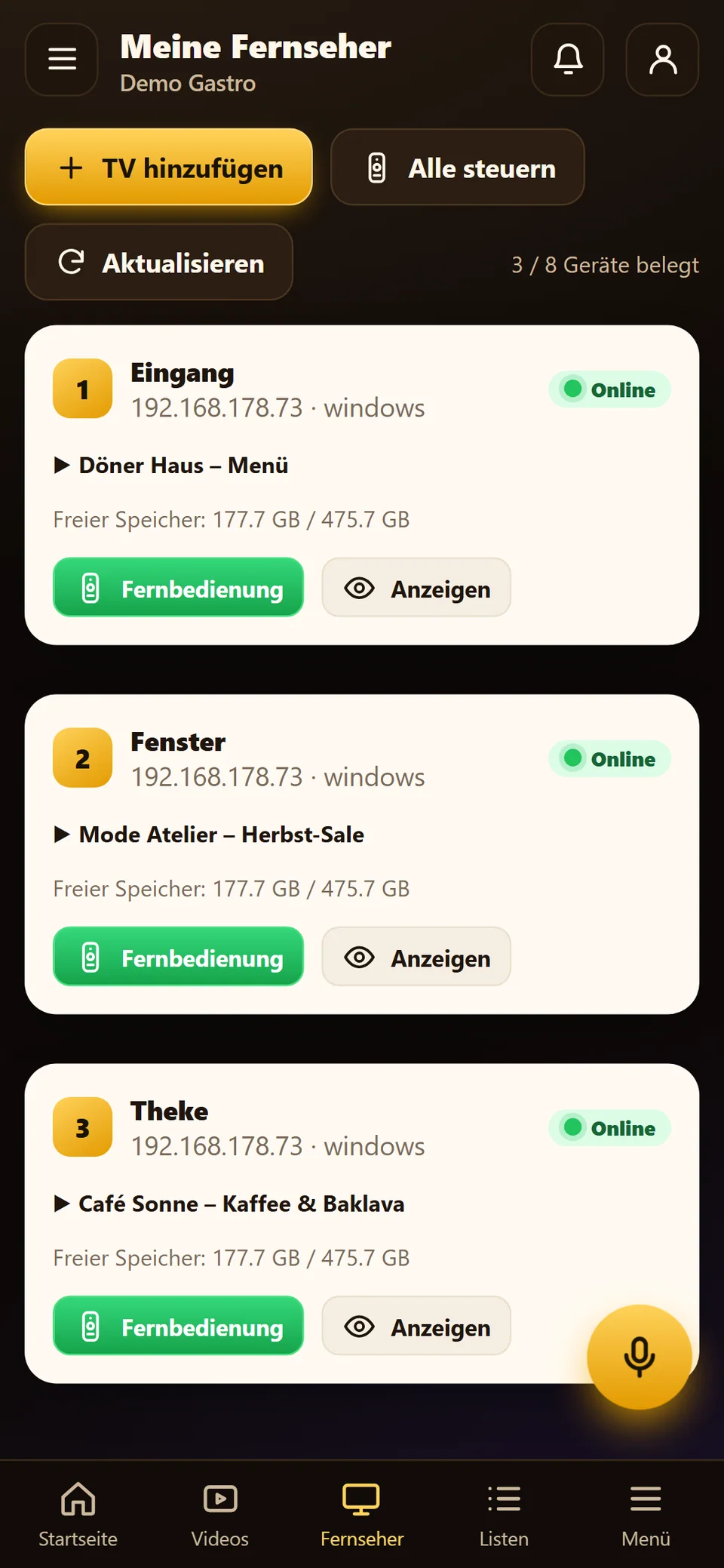
The patron panel on your phone finds the TVs on the Wi-Fi by itself – no code, no QR, no activation number.
-
3
Upload a video
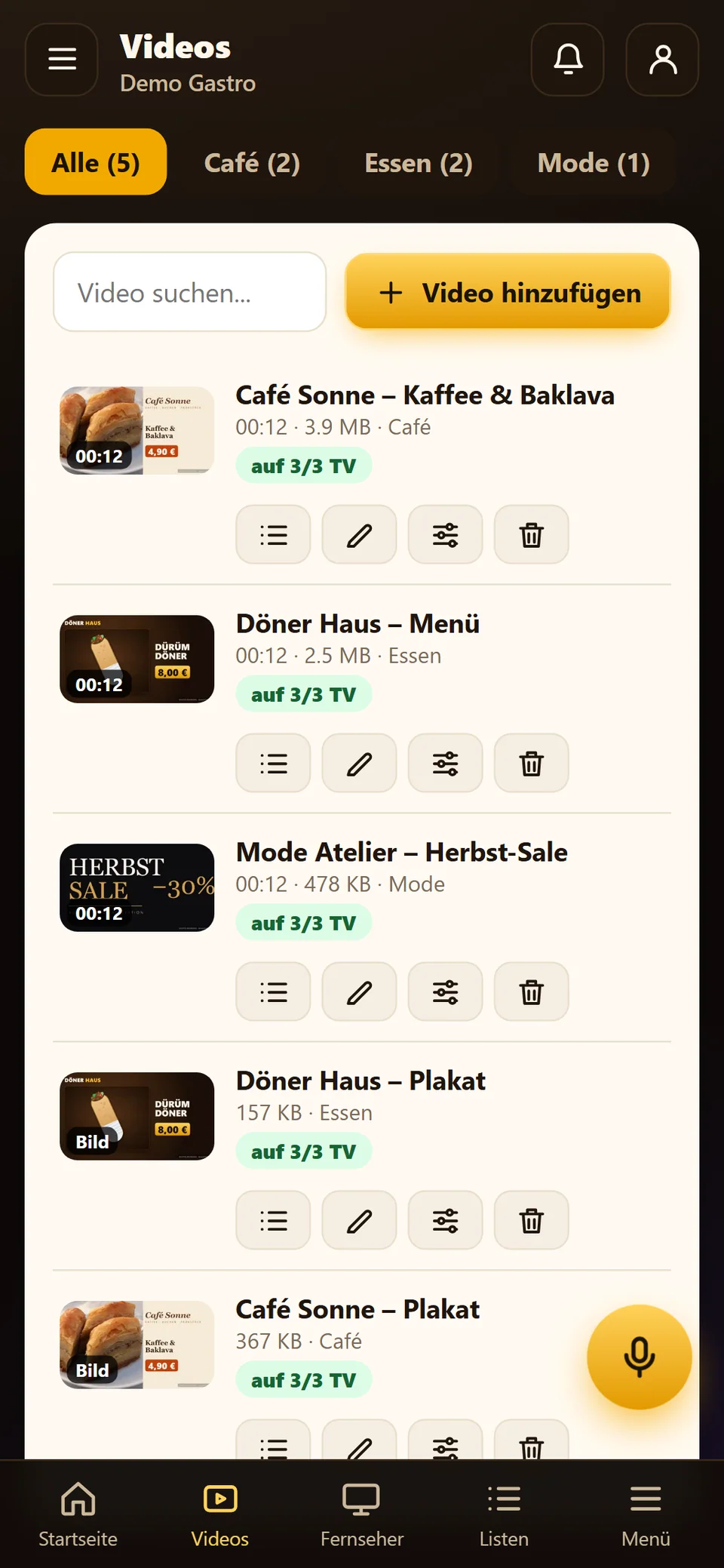
Pick a video or image. It is copied to every TV and checked first: the panel reports broken files or 4K problems right away.
-
4
Set the order
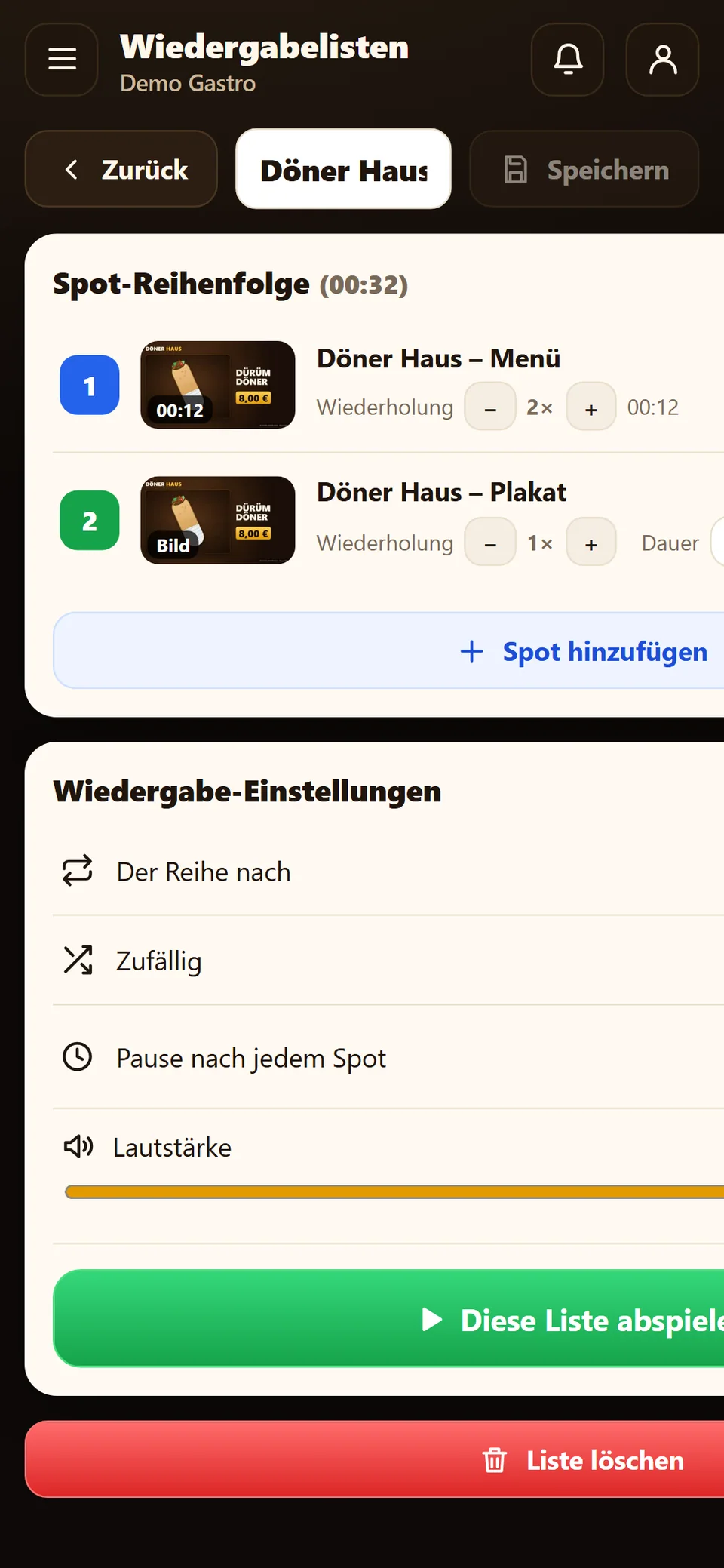
Sort playlists by dragging, set repeats and duration, and assign them to single TVs, groups or branches.
-
5
Plan by time
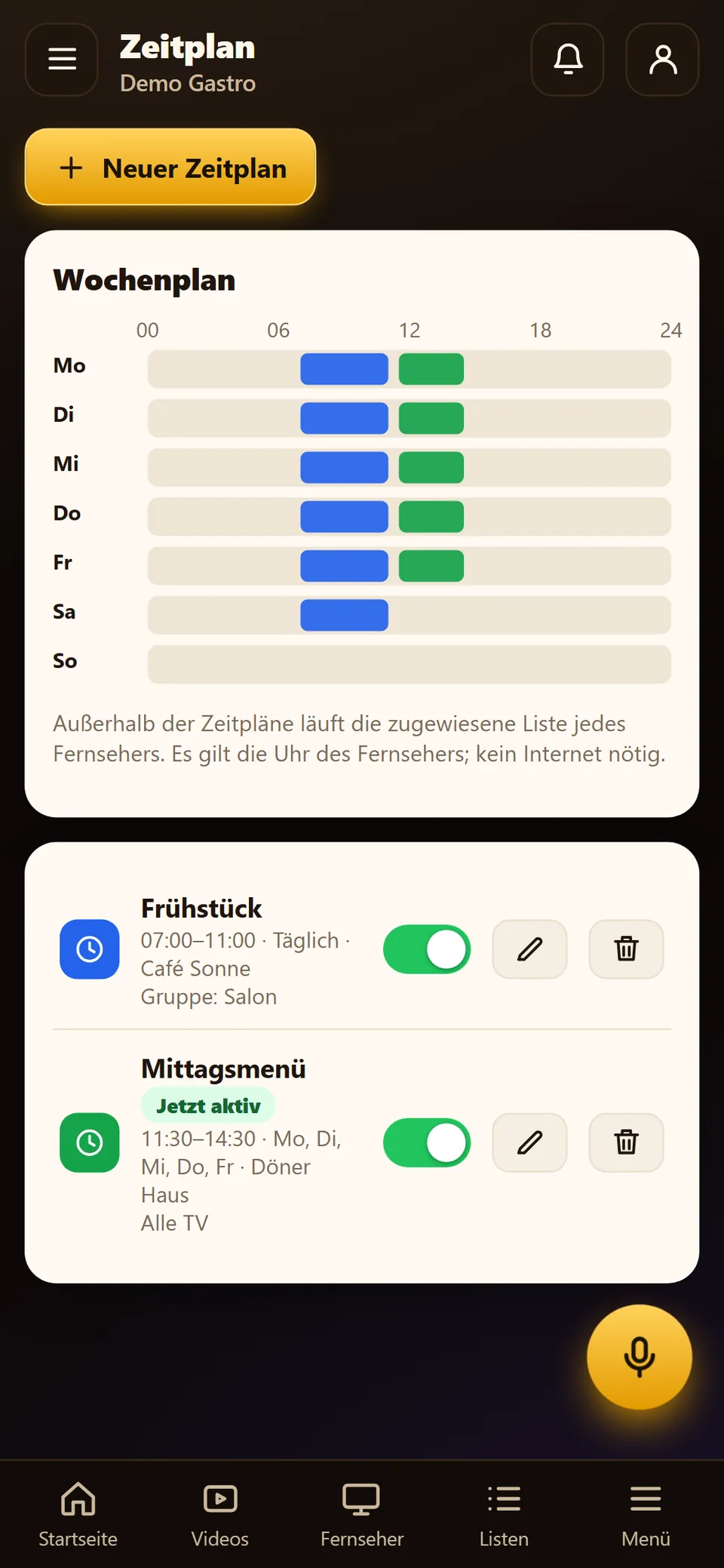
Breakfast 7–11, lunch menu until 2:30 pm – the TVs switch automatically. For promotions there are emergency ads.
-
6
Playing – even offline
The ad runs full screen in a loop. Power cut? The player restarts by itself. Internet down? Everything keeps running.

Videos & images
New ads on the TV in seconds
Choose a video or image on your phone or PC. BestellTakt.TV uploads it in parts (even on weak Wi-Fi, resuming automatically) and distributes it to every TV. Every file is checked before it goes on air.
- MP4 videos and images (JPG, PNG)
- Resumes after interruptions
- Warnings for broken files, HEVC and 4K
- Categories: café, food, fashion …

Playlists
The right ad on the right TV
Drag your spots into the order you want, set repeats and display time, and assign the list to one TV, a group or a whole branch.
- Order by drag and drop
- Repeats and duration per spot
- Shuffle if you like
- For a TV, group, branch or all

Schedule
Coffee in the morning, döner at noon, promotion at night
Decide when each list plays – by weekday and time, even across midnight. The TVs switch on their own, even without internet. The TV's clock counts.
- Weekly plan with times
- Across midnight (e.g. 10 pm–2 am)
- For groups or single TVs
- Switch on and off with one tap

Emergency ads
Instant promotion on every screen
“50% off desserts today” or “Kitchen closed”: an emergency ad plays immediately on all or selected TVs – for 30 minutes, until closing time or until you end it. TVs that are off pick it up when switched on.
- Overrides all lists and schedules
- For all TVs or only some
- Choose the duration
- One tap to end

Phone as remote
Every TV in your pocket
Play, pause, next, volume, change list – for one TV or all together. “Show” flashes the TV number big on the screen, so you instantly know which is which.
- One TV or all at once
- Volume and mute
- Show the TV number on screen
- Also with the TV remote (OK button)

USB stick
No Wi-Fi? Then use USB
Copy videos to a USB stick and plug it into the TV – the player plays them right away or copies them to the TV. Broken or unsupported files are listed in the panel. Even the licence file can arrive by USB.
- Play now or copy to the TV
- Order by file name (01_, 02_ …)
- Faulty files are reported
- Licence renewal via USB
- 01_Kaffee-Baklava.mp4
- 02_Doener-Menue.mp4
- 03_Herbst-Sale.mp4
Voice assistant
Just say what should play
The voice assistant in the patron panel understands your commands: start a video, stop a TV, change the volume, switch lists, start an emergency ad. It asks for confirmation on important actions and asks back when something is unclear.
- “Play the döner video on TV 2.”
- “Stop all TVs.”
- “Start the Café Sonne list from 7 to 11.”
The assistant understands German, Turkish, English, French, Arabic and Kurdish.

This is how it looks
Sample ads for a café, a takeaway and a fashion shop
Three examples of how your advertising can look on the TV. You use your own videos and images – we can help create them if you like.
Café Sonne
Coffee & baklava, hot drinks, künefe
Döner Haus
Dürüm, döner in bread, menu deal
Mode Atelier
Autumn sale, new collection, opening hours
Sample ads for fictitious businesses; photos: public domain/CC0 (Wikimedia Commons).
Patron panel
On the PC too – with every feature
The patron panel runs as an Android app, as a Windows program and in the browser. TVs, videos, lists, groups and branches, schedules, statistics as CSV/PDF and an illustrated guide – all in one place.
- Android app, Windows program, browser
- Groups and branches
- Statistics: what played how often, where
- Guide with pictures and read-aloud


Which TVs?
BestellTakt.TV runs best on Android TV, Google TV and Fire TV – with every feature. Any TV with HDMI gets there with an inexpensive Android TV stick.
Android TV / Google TV
Sony, Philips, TCL, Xiaomi, Hisense (Android): every feature incl. USB and autostart.
Amazon Fire TV
Fire TV Stick and Cube: install the app, add it in the panel – done.
Windows PC
Mini PC at the screen: full-screen player, autostart, USB.
LG webOS
As a screen that plays from the main TV (developer mode).
Samsung Tizen
As a screen of the main TV; installed with a Samsung certificate.
Hisense VIDAA
Via the TV's browser, from the main TV.
Any TV with HDMI
LG, Samsung, Panasonic or older sets: an Android TV stick or Fire TV Stick in the HDMI port turns any screen into a full ad TV – with USB, autostart and offline playback.
To be honest: we are still testing on real LG, Samsung and Hisense sets. We are happy to check in advance whether your TVs are suitable.
Runs in your shop – even without internet
No server, no mandatory cloud: every TV stores its licence, settings and videos itself. Phone and TVs find each other on the shop's Wi-Fi. If the internet fails or the phone is off, the ads keep running.
- Phone / PC
- Shop Wi-Fi
- TV
- Ad is playing
New: remote management over the internet – control your TVs from anywhere.
Multilingual
Patron panel, player, guide and voice assistant in German, Turkish, English, French, Arabic (right-to-left) and Kurdish.
- Deutsch
- Türkçe
- English
- Français
- العربية
- Kurdî
New
Remote management
Control your TVs from home or on the go. The sign-in is still checked by your own TV, the connection is encrypted (HTTPS) and your videos stay on your devices.
Set it up yourself – or get help
You can set up BestellTakt.TV yourself in a few minutes. If you like, we support you.
- Install the player on your TVs
- Set up the patron panel on your phone
- Create the first videos and playlists
- Schedules for breakfast, lunch and evening
- Create ad videos from your photos
- Advice on TVs, sticks and mounts
- A short briefing for you and your team
Extra services on request – we agree on scope and price with you in advance.
BestellTakt.TV on video
From the video on your phone to the ad on every TV – explained in one minute.
Frequently asked questions
What is BestellTakt.TV?
An ad TV system: you show your own videos, images, offers and prices on one or more TVs and control everything from your phone or PC.
Do I need internet?
No. Phone and TVs only need to be on the same Wi-Fi. Videos are stored on every TV and keep playing without internet. Remote management from outside needs internet.
Which TVs can I use?
Android TV, Google TV and Fire TV with every feature, plus Windows PCs. LG, Samsung and Hisense work as a screen of the main TV or with an Android TV stick in the HDMI port.
How many TVs are possible?
As many as your licence has device slots. More slots can be added at any time.
Do I have to enter a code or QR?
No. The panel finds your TVs on the Wi-Fi by itself. You only sign in with your username and password.
What happens after a power cut?
The player starts again by itself and continues where it was.
Which files can I use?
Safest is MP4 (H.264 + AAC) in Full HD, plus JPG and PNG images. The panel checks every file and warns about problems.
Can I change the ads by time of day?
Yes. In the schedule you decide which list plays on which days and from when to when – even across midnight.
Where is my data?
On your own TVs. There is no mandatory cloud; videos and settings only leave your shop if you use remote management.
What does BestellTakt.TV cost?
You get a licence for 1, 2, 3 or 5 years or unlimited, depending on the number of TVs. Ask us for an offer.
Contact & demo
Would you like to see BestellTakt.TV on your TV? Write to us – we will get back to you quickly.
- Contact personFerhat Tuncer
- Location66333 Völklingen, Deutschland
- Phone0176 31608083